Contributor Highlights 1.2.0 supports the redesigned WordPress.org profiles with richer cards, section toggles, and updated shortcode options.
WordPress.org contributor profiles have a fresh new look, and Contributor Highlights is now ready for it.
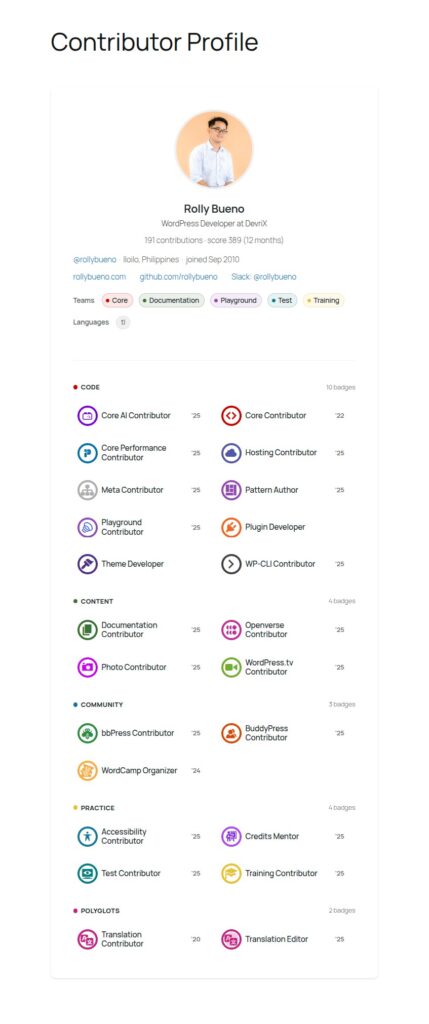
Contributor Highlights 1.2.0 is a major update built around the redesigned profiles.wordpress.org layout. If you use the plugin to display your WordPress.org profile on a personal website, portfolio, agency page, or community site, this release makes your profile card feel more complete, more useful, and more aligned with the new WordPress.org profile experience.
The plugin works the way users expect: add a Gutenberg block or use the contributor_profile shortcode, enter a WordPress.org username, and display a styled contributor profile card on your site. No API keys are required, and profile data is cached for 6 hours to keep things efficient.
What’s new in Contributor Highlights 1.2.0
The biggest change in version 1.2.0 is full support for the redesigned WordPress.org profile pages. The plugin has been updated to read the new profile layout and render richer information in a cleaner profile card.
Redesigned profile support
WordPress.org recently updated the structure and design of contributor profile pages. Because of that, older profile parsing no longer worked reliably.
Contributor Highlights 1.2.0 updates the profile parser and card renderer so the plugin can work with the new profiles.wordpress.org layout. This means your contributor card can once again pull in public profile details and display them properly on your own WordPress site.
A fuller profile card
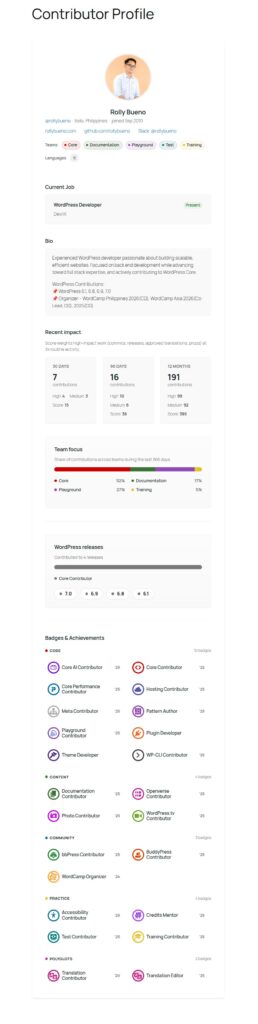
This release gives the full profile card a much richer layout.
The header now includes the contributor avatar, name, handle, location, joined date, profile links, teams, and languages. It gives visitors a quick overview of who the contributor is and how they are involved in the WordPress project.
The current job section can now be displayed as its own part of the profile card, separate from the main profile meta. This helps contributors share a little more context about their professional work without mixing it into the rest of the profile details.
The bio section has also been improved with a read more/read less experience. Long bios are limited to 300 words by default, keeping the card readable while still allowing visitors to expand and learn more.
Recent impact and contribution focus
Contributor Highlights 1.2.0 now includes a Recent Impact section that highlights contribution activity across 30 days, 90 days, and 12 months. It gives a simple snapshot of recent involvement without turning the card into a full activity feed.
There is also a Team Focus chart for the full profile card. This shows a 365-day contribution distribution by team, helping visitors understand where someone has been most active over the past year.
For contributors who are active across multiple areas of the WordPress project, this adds useful context beyond badges alone.
WordPress releases and badges
The full profile card can now show WordPress release involvement using a stack bar and version chips. The legend has been simplified so it focuses on role labels, making the section easier to scan.
Badges are now grouped by category and moved toward the end of the full card. This makes the card flow more naturally: profile details first, contribution highlights next, and badges as a strong closing section.
Better editor controls with Display Sections
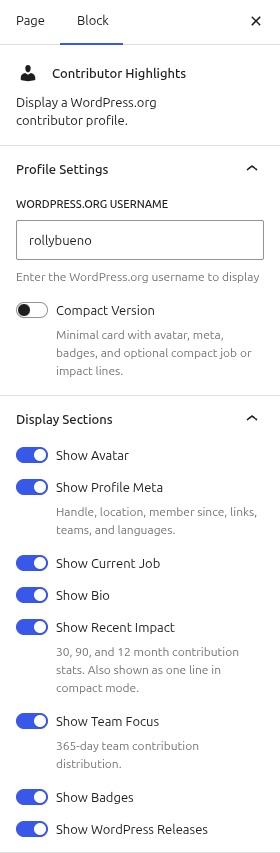
One of the most useful changes in this release is the new Block Display Sections panel.
When using the Gutenberg block, you can now toggle individual sections directly in the editor. Available section controls include:
- Avatar
- Profile meta
- Current job
- Bio
- Recent impact
- Team focus
- Badges
- WordPress releases
This makes the block much more flexible. You can create a simple card for a landing page, a detailed card for a personal profile, or a curated contributor section for an agency or community site.
It is also a very screenshot-worthy improvement: open the block settings, switch sections on or off, and shape the card based on the story you want to tell.
Team chips now match WordPress.org badge colors
Teams shown in the profile meta are now displayed as color-coded chips inspired by WordPress.org badge colors.
For example, Core appears in red. This small design detail helps the card feel closer to the WordPress.org profile experience while making team involvement easier to scan visually.
Compact mode vs full card
Compact mode is still supported in Contributor Highlights 1.2.0.
Use compact mode when you need a smaller card, such as on a team grid, author box, sidebar, or contributor listing. It keeps the display lighter and more focused.
Use the full card when you want to tell a more complete contributor story. The bio, team focus chart, and WordPress releases sections are designed for the full-card layout only, so they are not shown in compact mode.
Improvements and fixes
Alongside the larger profile updates, version 1.2.0 includes several refinements:
- Shortcode booleans now work correctly, such as
show_bio="false" - Typography is more consistent across the bio, badges, and section headings
- Contributor names are now smaller and better balanced
- Badges have been moved to the end of the full card
- Bio paragraphs have improved spacing for readability
- The WordPress releases legend has been simplified to focus on role labels only
These changes help the card feel cleaner, more polished, and easier to use across different site designs.
Upgrade notes
Contributor Highlights caches profile data for 6 hours. After upgrading to version 1.2.0, you may need to wait for existing profile caches to expire before the new layout and profile sections appear correctly.
If you want to refresh the data right away, you can clear the related profile transients after upgrading.
Upgrade notice: Major update for the redesigned WordPress.org profile layout. Adds new profile sections, block display toggles, and refreshes parsing and styling. Clear profile caches or wait for them to expire after upgrading.
Shortcode examples
You can still use the plugin with the contributor_profile shortcode.
Basic example:
contributor_profile username="your-username"
Advanced example:
contributor_profile username="your-username" show_team_focus="false" show_releases="false" compact_version="false"
This gives developers and site owners more control over what appears on the front end, especially when building profile sections, portfolio pages, or contributor directories.
For developers
Contributor Highlights 1.2.0 adds new shortcode attributes including show_current_job, show_team_focus, and show_releases.
The show_meta option controls profile details such as handle, location, links, teams, and languages. Current job is handled separately through show_current_job.
The show_contributions option controls the Recent Impact stats section.
Boolean shortcode attributes now accept true, false, yes, no, 1, and 0, making shortcode configuration more predictable.
Update to Contributor Highlights 1.2.0
Contributor Highlights 1.2.0 is built for the new WordPress.org contributor profile experience.
Whether you are showcasing your own WordPress.org profile, highlighting contributors on a community site, or displaying team members on an agency website, this release gives you a better and more flexible way to celebrate open source contribution.
Update to Contributor Highlights 1.2.0 from WordPress.org or GitHub and refresh your contributor profile card for the new profiles.wordpress.org layout.
Leave a Reply